
Work settings
Set response targets, reminders and escalation, what the server may read in requests, how long finished requests are kept, and how My work notifies people.
Who can use this
OwnerCompany adminRequirements
None beyond the role
Work settings decide how requests and approvals work in your company. Open Company admin → Work → Work settings.
| Section | What you set there |
|---|---|
| Request types | The forms people fill in. See Request types and approval chains |
| Routing & approvals | Approval steps and amount thresholds. Same article |
| SLA & reminders | Response targets, reminders, escalation (below) |
| Queues | Department queues and who answers them. See Department queues |
| Procurement desk | Which department's Department manager runs purchase requests and supplier quotes. See Procurement desk |
| Leave policies | Leave types, balances, holidays. See Leave policies and balances |
| Privacy & data | What the server may read, and retention (below) |
| Notifications | Push, email, quiet hours, morning summary (below) |
SLA & reminders
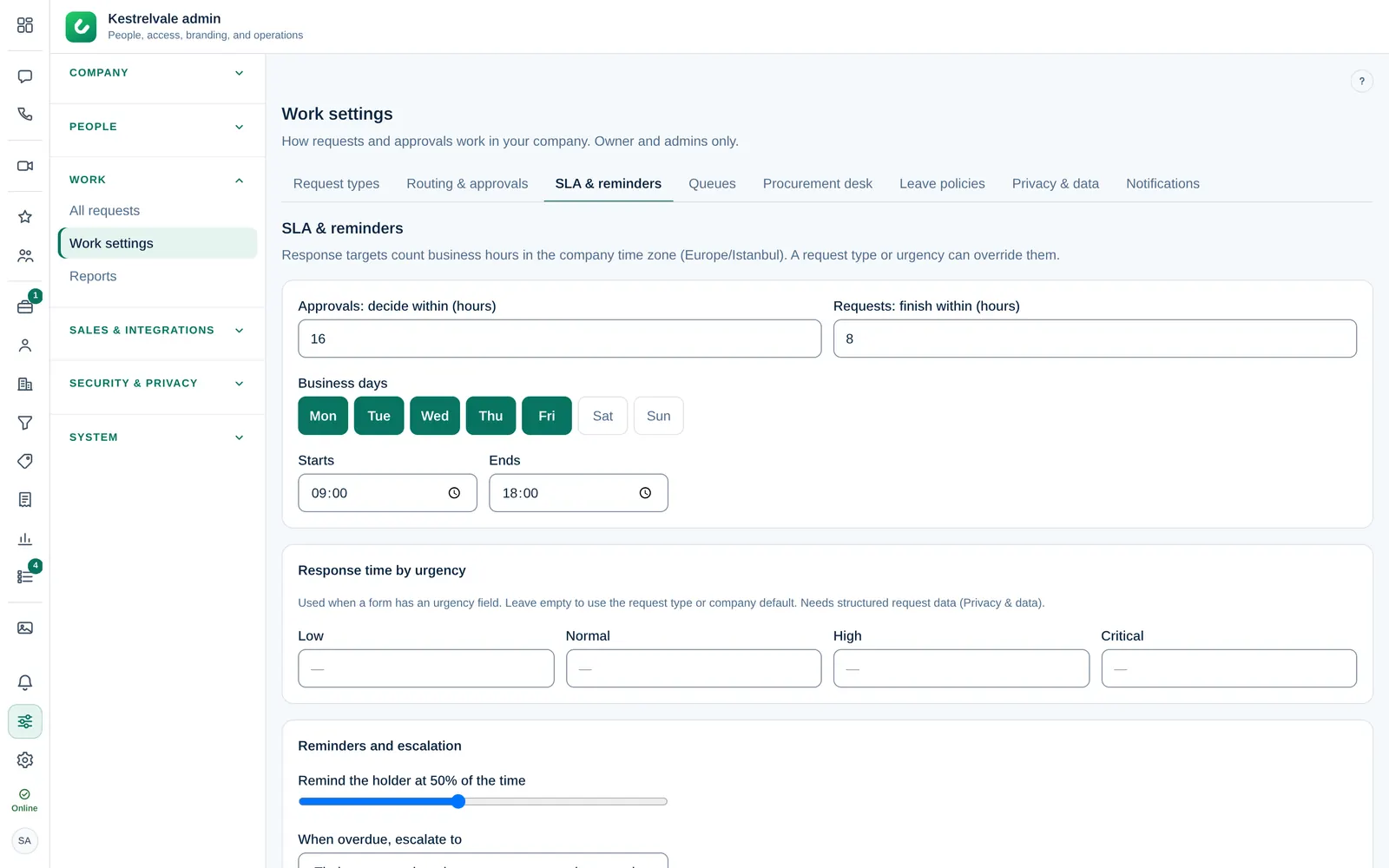
- Approvals: decide within (hours) and Requests: finish within (hours) are the company targets. A request type or an urgency can override them.
- Business days, Starts and Ends set when the clock runs. Targets count business hours in the company time zone.
- Pause on public holidays with a Holiday country skips the holidays from Leave policies.
- Response time by urgency is used when a form has an urgency field.
- Under Reminders and escalation, choose When overdue, escalate to: Their manager, then department manager, then an admin, The department manager, then an admin, or An admin.
Privacy & data
Requests are encrypted. With Structured request data on, the server can also read a few fields of new requests:
| Readable by the server when on | Always encrypted |
|---|---|
| Amount and currency, Category and urgency, Leave type and dates | Titles, descriptions, reasons, Comments and decision notes, Files |
These fields power amount thresholds, urgency targets, leave balances, the Time off calendar and reports. Select Turn on or Turn off and confirm. Turning it off keeps new requests fully encrypted; data already stored stays until you delete it.
Under Keep finished requests, set Archive closed items after (days) and Delete archived items after (days), then Save retention.
Owner Delete structured data removes the readable copy from every request and turns the setting off. Only the Owner can do this, by typing the confirmation word. The encrypted requests stay.
Notifications
These are the defaults for My work. People can still mute the morning summary for themselves, and Do not disturb is always respected.
- Push notifications and Email for new requests, decisions, reminders and escalations. The request text is never in the email.
- Approve from the notification: Approve and Reject buttons on web notifications. Reject always asks for a reason in the app.
- Approve from email: a single-use button in the approval email. It needs the approver to be signed in and expires after 72 hours.
- Escalations ignore quiet hours and Critical requests ignore quiet hours (the second needs structured request data).
- Morning summary: counts only, in each person's time zone. Choose Send at and Save time.