
Lead settings
Hand out new leads automatically per channel or country, set a first-reply target with escalation, block senders and choose how long dismissed leads are kept.
Who can use this
OwnerCompany adminRequirements
- CRM access (department, personal grant or channel)
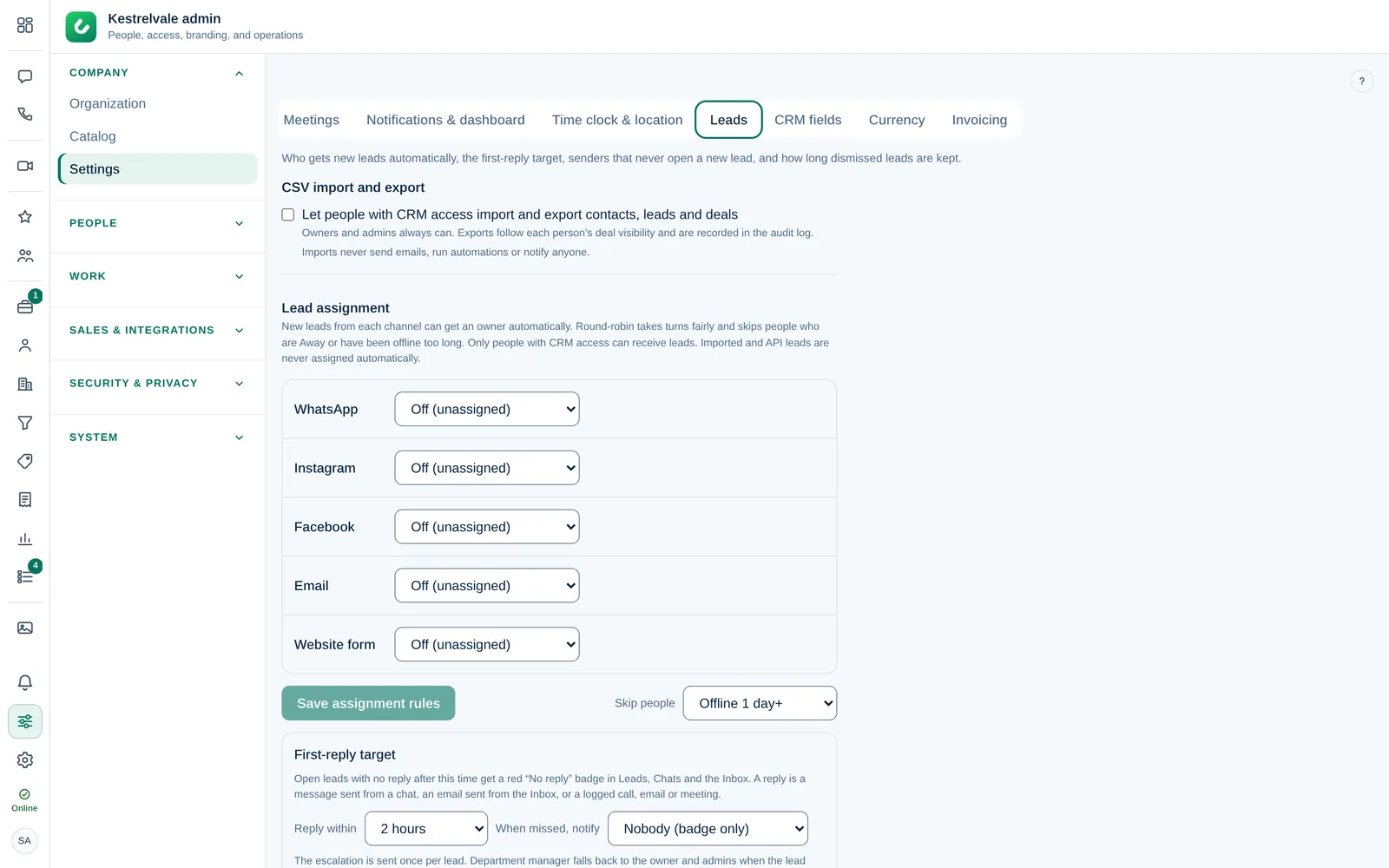
These settings decide who gets new leadsLead A new enquiry that has not been qualified yet, for example a WhatsApp message, a web form or an imported row. You work a lead and then convert it into a deal or dismiss it. and how fast your team must answer. Open Company admin → Company → Settings → Leads. Unlike the other tabs, there is no save button at the bottom: each card saves on its own.
Hand out leads by channel
Under Lead assignment, choose for each channel (WhatsApp, Instagram, Facebook, Email, Web forms…):
- Off (unassigned): new leads wait without an owner until someone selects Take it.
- Round-robin: leads take turns between the Selected people, fairly.
- Specific person: every lead from this channel goes to one person.
Under Skip people, choose Skip people offline for, for example Offline 3 days+, or Never skip. Round-robin always skips people whose status is Away. The card shows Next lead goes to with a name, or Nobody is available right now; new leads stay unassigned.
Select Save assignment rules. Skip people and the first-reply target below are saved as soon as you change them.
Only people with CRM access can receive leads. Leads from a CSV import or the API are never assigned automatically.
Rules per brand
When you have brands, Brand overrides appears below the channel rules. Each brand starts with Uses company rules for every channel. To give a brand its own rule, select Override for this brand next to the channel, choose Off: nobody is assigned automatically, Round-robin or Specific person, and select Save. Use company rules removes the override again.
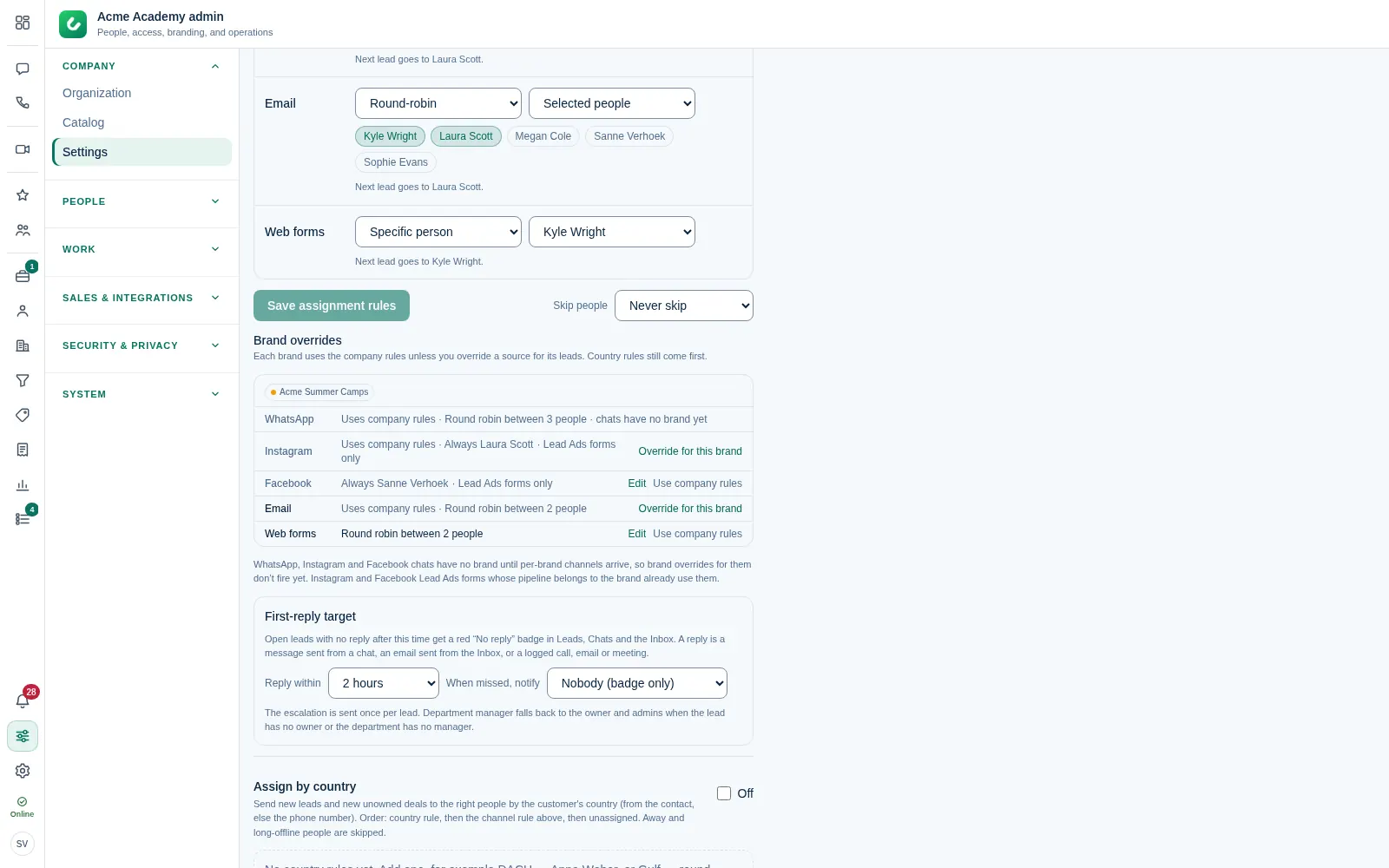
A brand's rule is used for the brand's own leads, for example the web forms and inboxes of Acme Summer Camps. An override set to Off: nobody is assigned automatically keeps that brand's leads unassigned, even if the company rule would assign them.
WhatsApp, Instagram and Facebook chats do not belong to a brand yet, so they always use the company rules and their rows are greyed out. Instagram and Facebook Lead Ads forms only: a Lead Ads form whose pipeline belongs to the brand already uses the brand's rule.
Hand out leads by country
Under Assign by country, select + Add rule, give it a name (for example DACH), select + Add countries or a region and choose One person or Round-robin. Dromix takes the country from the contact, or else from the phone number.
The order is: country rule first, then the channel rule above, then unassigned. Select Save rules. Use Move up and Move down to change the order of the rules.
First-reply target
Under First-reply target:
- In Reply within, choose the time your team has to answer, or Off.
- In When missed, notify, choose Nobody (badge only), Owner and admins or Department manager.
Open leads with no reply after this time get a red No reply badge in Leads, Chats and the Inbox. A reply is a message sent from a chat, an email sent from the Inbox, or a logged call, email or meeting. The notification is sent once per lead.
Blocked senders and retention
Under Lead filters · blocked senders you see every sender that never opens a new lead, and you can add or remove them. See Dismiss a lead and block senders.
Under Delete dismissed leads after, choose Never (off), 90 days, 180 days, 1 year or 2 years. Dismissed leads and spam contacts without deals are then deleted automatically, counted from the dismissal. Chats and mailboxes are not touched.
CSV import and export
Under CSV import and export, turn on Let people with CRM access import and export contacts, leads and deals. The Owner and Company admins always can. Exports follow each person's deal visibility and are recorded in the audit log. Imports never send emails, run automations or notify anyone.